
Manual pallet identification
Workers may depend on barcode scanning or manual data entry at every movement point.
Warehouse Automation
Track pallets, inventory and warehouse movements using RFID while connecting physical events with WMS, ERP and SAP workflows.
CoEnablers integrates RFID readers, antennas, handheld devices, tags and warehouse software to automate identification from receiving through dispatch.
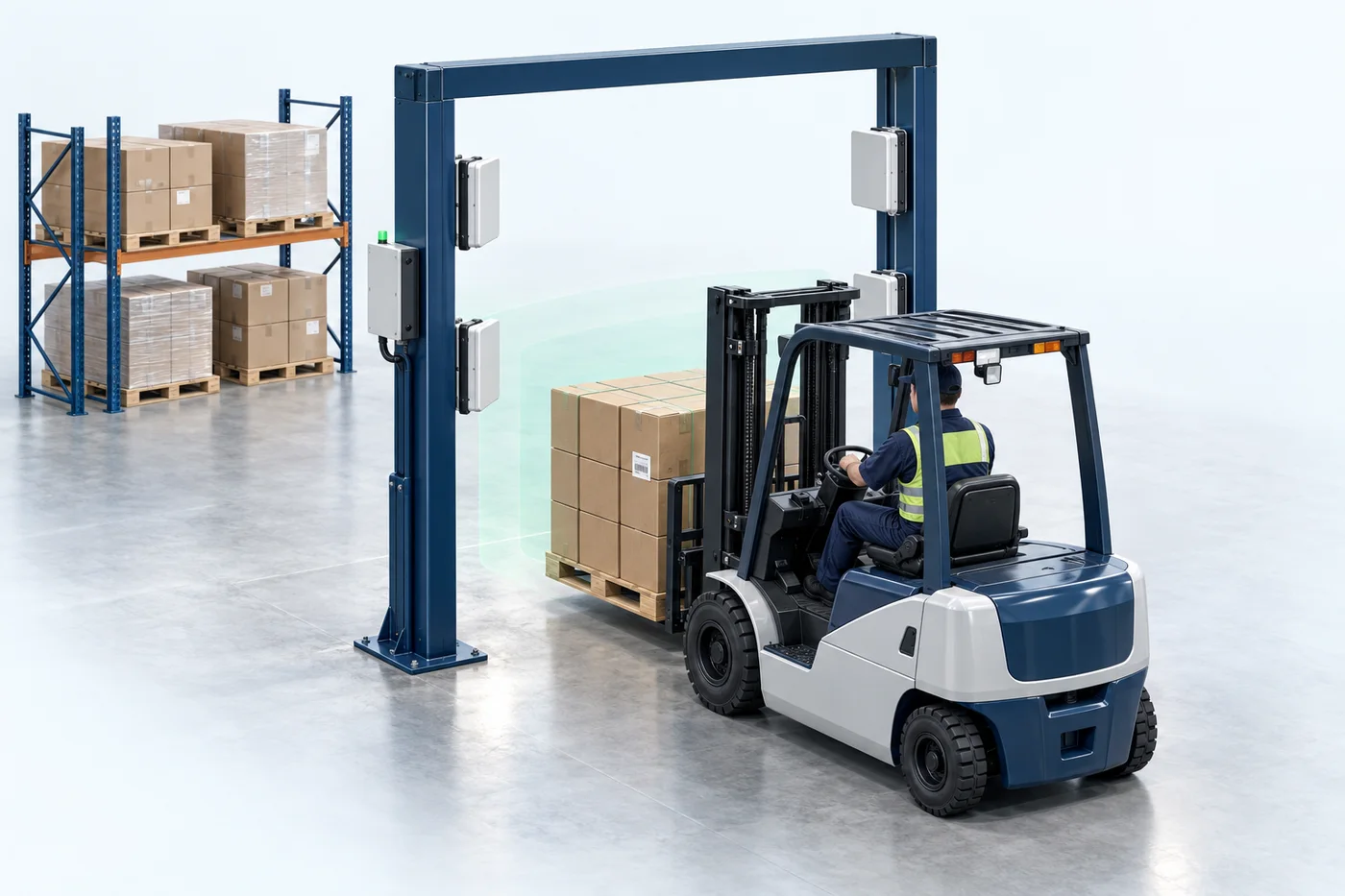
A controlled read zone
The operational connection
An RFID read identifies a tag. A useful warehouse transaction also needs context: the pallet associated with that tag, the read zone, the movement being performed and the business rules that apply. CoEnablers connects these layers so identification can support the operational workflow.
The approach can complement an existing WMS or ERP rather than replace it. Define the points where automated identification is useful, retain operator checks where needed, and agree how validated events update the system of record. Tag selection, read-zone design and warehouse conditions should be assessed before rollout.
Business challenges
Start with the points where identification, location and business records become disconnected.
Workers may depend on barcode scanning or manual data entry at every movement point.
Inventory may exist in the system while the actual physical location is unclear.
Traditional inventory counting can require extensive manual scanning.
Incorrect pallets can reach staging or dispatch without additional verification.
RFID devices and warehouse transactions often need integration with ERP or WMS systems.
From receiving to dispatch
Use the same identified warehouse unit through each stage, with validation at the points that matter to your process.
Material arrives and is identified against purchase, ASN or inbound information.
A pallet, container or item is associated with an RFID tag.
Warehouse operators or fixed infrastructure capture movement into storage.
RFID handhelds or fixed readers help identify tagged inventory.
Pallets or items are selected according to warehouse requirements.
RFID gates or handheld devices can verify outgoing material before shipment.
Validated transactions are transmitted to the customer's WMS, ERP or SAP environment.
Identification with context
Associate RFID tags with pallets, containers, assets or products.
Capture movements automatically through RFID portals or operational zones.
Support inventory counting, search, receiving and operational verification using handheld readers.
Maintain location and movement history for identified warehouse units.
Validate tagged material before it leaves the warehouse.
Identify unexpected or invalid warehouse movements.
Send validated warehouse events to enterprise systems.
Maintain history of identification and movement transactions.
A connected architecture
Separate device reads from business transactions. Filter events, establish context and apply the warehouse rules before updating enterprise systems.
The identification layer
Reader placement and tag choice should follow the material, environment and warehouse task—not a universal hardware recipe.
Identification
Choose tags and encoding suitable for the unit being identified and the surface to which the tag is attached.
Shape the intended read zone with antenna placement, orientation and configuration suited to the movement point.
Capture
Capture tag observations at portals or controlled operational zones and pass events to the integration layer.
Support operator-led counting, search and verification where a fixed read point is not appropriate.
Business context
Associate identifiers with warehouse records and apply workflow checks before creating transactions.
Map validated movements to the approved APIs, middleware or interfaces of the customer's systems.
Choose by operation
| Consideration | Fixed RFID | Handheld RFID |
|---|---|---|
| Capture approach | Automatic movement capture at a configured read zone. | Operator-directed reading for a warehouse task. |
| Typical locations | Gate or portal identification and controlled transition points. | Storage areas, receiving locations and exception-handling points. |
| Operational fit | Unattended reading at defined movement points. | Inventory counting, item search, receiving and mobile verification. |
| Process considerations | Read-zone design, movement direction and filtering need to match the physical process. | Operator workflow, task selection and record validation need to remain clear. |
Many warehouse deployments use both fixed and handheld RFID rather than selecting only one.
Technology independence
Not every warehouse process requires RFID. Barcode may remain appropriate for labels, documents, low-value inventory or manual workflows, while RFID can automate selected high-volume movement points.
Operational benefits
Focus on process improvements that can be checked against your own workflow, without assuming a fixed performance gain.
Use suitable read points to capture tagged units while retaining checks for exceptions.
Relate reads to known zones, warehouse units and validated movement events.
Make identification events available within the operational systems used by the team.
Keep a history of identification, validation and enterprise posting for review.
Check tagged material against the expected outbound workflow before shipment.
Industry use cases
Identify materials and pallets moving between receiving, stores and production.
Explore industry applications for ManufacturingRelate receiving, inventory and dispatch events to the relevant warehouse records.
Explore industry applications for 3PL & WarehousingTrack components, pallets and returnable containers between receiving, stores and production.
Explore industry applications for AutomotiveSupport controlled identification and inventory workflows with appropriate process validation.
Explore industry applications for PharmaceuticalSupport inventory visibility and movement verification across distribution operations.
Explore industry applications for Retail DistributionWork with your existing systems
Agree the transaction ownership, identifier mapping and validation rules before connecting devices to enterprise workflows. Integration methods depend on the interfaces available in your environment.
Practical questions
It combines RFID identification with software that relates tag reads to warehouse records and workflows. Readers identify tagged units; the software applies context and rules for tasks such as receiving, inventory and dispatch. It can complement an existing WMS rather than replace every warehouse function.
Yes, when the existing system provides an appropriate integration interface. The design must map tag identities to business records, validate events and agree which system owns each transaction. API availability, master data and exception handling should be reviewed before implementation.
RFID events can be connected to SAP workflows through approved interfaces or middleware available in the customer's environment. The appropriate method depends on the SAP landscape, transaction requirements and access controls. A device read should be validated before it becomes a business posting.
UHF RFID uses radio waves and does not require optical line of sight like a barcode. That does not mean every tag can be read through every material. Tag type, placement, metal or liquids, antenna configuration and the warehouse environment can affect the read zone and must be assessed.
Yes. A warehouse can use RFID at selected movement points and retain barcode for documents, labels or operator-led checks. Both identifiers should map consistently to the relevant warehouse unit so the same workflow does not create conflicting records.
Fixed readers suit defined transitions such as receiving or dispatch portals. Handheld readers suit inventory counting, search and mobile verification. Many processes use both. The choice depends on material movement, tag type, read-zone coverage and how operators work.
It can support automatic updates when tag reads can be associated reliably with the intended movement and validated against warehouse rules. Duplicate observations and unintended reads need handling. Read-zone design, process direction and ERP/WMS workflow determine whether an update can be posted automatically or requires review.
Typically the tag carries an identifier, such as an EPC, that software associates with the pallet or item record. Some tags support additional user memory; capacity and encoding depend on the tag and application. Detailed warehouse history generally belongs in the software rather than being stored entirely on the tag.
Discuss your workflow
Tell us about your warehouse workflow, pallet volumes, existing identification process and ERP/WMS environment. We can help determine where RFID, barcode or a hybrid approach makes sense.